If your Dyson V15 Detect™ Origin cordless vacuum is losing its charge faster than expected, it can be frustrating. Battery issues are common with cordless vacuums, but many can be fixed with proper troubleshooting. This guide provides practical, safe steps to diagnose and improve your vacuum’s battery life, ensuring you get maximum cleaning time.

Get cleaning gear delivered free with Prime
- Fast, free delivery on millions of items
- Prime Video, Amazon Music and more included
- Member-only deals all year
Before starting, ensure your vacuum is turned off and unplugged if applicable. Regular maintenance like cleaning filters and checking for obstructions can also help prolong battery performance.
Key Takeaways
| Battery health matters | A declining battery affects run time significantly. |
| Clean filters regularly | Dirty filters can strain the motor and reduce efficiency. |
| Check for obstructions | Blockages can cause the vacuum to work harder and drain the battery. |
| Replace aged filters | Old or clogged filters impair suction and battery longevity. |
| Consider battery replacement | If the battery is old or degraded, replacing it can restore runtime. |
Step 1: Check the Battery Health
- Ensure your vacuum’s firmware is up to date using the LCD screen’s maintenance menu.
- Observe if the run time is consistently shorter even after full charges.
- If the battery is old or showing signs of wear (rapid draining, unable to hold charge), consider replacement.
Step 2: Clean and Maintain Filters
- Remove the pre-filters and filters from the vacuum.
- Rinse the filters under water and wring out excess moisture.
- Allow filters to air dry completely before reinstalling, typically 24 hours.
- Replace filters if they are damaged or excessively dirty.
Step 3: Clear Obstructions and Check the Cleaner Heads
Inspect the cleaner heads for tangled hair or debris that can reduce suction and increase motor load. Remove any blockages or debris carefully. Clear the wand and hose passages as well.
Step 4: Optimize Charging and Storage
- Charge the vacuum fully in a cool, dry place without interruption.
- Avoid leaving the vacuum on the charger longer than recommended.
- Store the vacuum in a position that prevents battery drain when not in use.
Step 5: Replace the Battery if Necessary
If after all maintenance steps the battery still drains quickly, replacing it may be necessary. Consult Dyson’s customer support or authorized service centers for compatible batteries or consider purchasing a replacement battery designed for the Dyson V15 Detect™.
The Products in This Guide

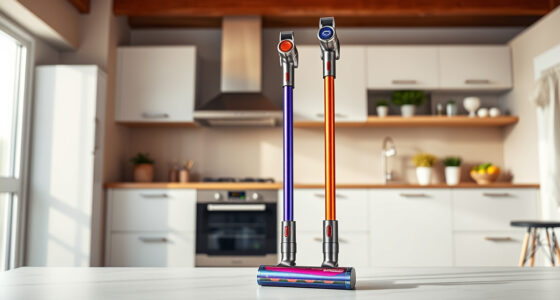
Dyson V15 Detect™ Origin Cordless Vacuum
- ✔ Weight: 6.8 lbs
- ✔ Charge Time: 3.5 hours
- ✔ Battery Type: Removable lithium-ion

LANMU Crevice Tool Vacuum Attachments Compatible
- ✔ Length: 14 inches
- ✔ Weight: 0.3 lbs
- ✔ Material: Plastic
Dyson V15 Detect™ Origin Cordless Vacuum
The Dyson V15 Detect™ Origin offers 60 minutes of run time, intelligent power adjustment, and a laser that reveals invisible dust, making it a top choice for thorough home cleaning.
Pros:
- Powerful suction with 100% more power
- Intelligent debris detection
- LCD screen with real-time data
- Deep cleaning with advanced heads
Cons:
- Battery life can diminish over time
- Filter maintenance required
- Higher price point
Best for: Whole-home deep cleaning, pet owners, hard floors
Not ideal for: Light cleaning tasks, long-term battery degradation
Bottom line: The Dyson V15 Detect™ is a powerhouse, but regular maintenance and possible battery replacement are key to sustained performance.
LANMU Crevice Tool Vacuum Attachments Compatible
The LANMU Crevice Tool fits Dyson models well and helps reach tight spots and corners, making cleaning easier and more thorough.
Pros:
- Narrow nozzle for tight spaces
- Flexible and slim design
- Compatible with many Dyson models
- Great for car and home edges
Cons:
- May not fit all Dyson models
- Attachment can be small for large debris
- Requires proper attachment handling
Best for: Cleaning corners, car interiors, gaps
Not ideal for: Heavy-duty debris removal
Bottom line: A handy tool to maximize your Dyson’s reach and cleaning efficiency.
Frequently Asked Questions
Why does my Dyson battery drain so quickly?
Battery degradation over time, dirty filters, obstructions, or old filters can cause rapid battery drain. Regular maintenance and replacement can help.
Can I replace the Dyson battery myself?
Yes, if you have a compatible replacement battery and some technical skill. Otherwise, contact Dyson support or authorized service centers for replacement.
How often should I replace the filters?
Filters should generally be replaced every 2-3 months or when they become excessively dirty or damaged.
What should I do if my vacuum still has poor battery life after maintenance?
Consider replacing the battery or contacting Dyson support for further diagnosis. Sometimes, a battery replacement is the only solution for degraded performance.
Keep Your Dyson V15 Detect in Peak Condition
Regular maintenance, filter replacement, and mindful storage are key to extending your cordless vacuum’s battery life. When all else fails, a battery replacement can restore the powerful cleaning experience you expect from Dyson. Follow these steps for a longer-lasting, more efficient vacuum and enjoy cleaner, healthier living spaces.
Affiliate disclosure: As an Amazon Associate we earn from qualifying purchases. Prices and availability are accurate as of the time of publishing.
Columbus Day / Indigenous Peoples' Day Picks
long weekend sales
As an affiliate, we earn on qualifying purchases.