
Keeping your Roborock S8 Pro Ultra in top condition is essential for maintaining its cleaning performance and longevity. Regular cleaning of the various components prevents debris buildup, ensures effective suction, and extends the lifespan of your device. This guide provides simple, clear steps to clean your robot safely and thoroughly.
Follow these instructions carefully to avoid damage and ensure your device continues to operate at its best.
Key Takeaways
| Regular maintenance ensures optimal performance | Cleaning your Roborock S8 Pro Ultra regularly prevents debris buildup and maintains suction power. |
| Use proper cleaning tools | Avoid harsh chemicals and opt for soft cloths and brushes recommended for robot vacuum parts. |
| Focus on filters and brushes | Filters, brushes, and Mop pads require regular attention for best results. |
| Power off before cleaning | Always turn off and unplug your robot before starting cleaning procedures. |

roborock 2026 New Qrevo S Pro Robot Vacuum and Mop, 18,500Pa Suction
- All-in-One Dock: Automatic dust emptying and self-cleaning
- High Suction Power: 18500Pa for deep cleaning
- Pet-Friendly Anti-Tangle System: Reduces hair wrap and simplifies maintenance
As an affiliate, we earn on qualifying purchases.
Power Down and Prepare
- Ensure your Roborock S8 Pro Ultra is turned off and unplugged from its charging dock.
- Remove the robot from the dock to access its components easily.
Clean the Main Body and Sensors
- Use a soft, damp cloth to wipe the exterior surfaces, avoiding any openings or vents.
- Gently clean sensors and cameras with a microfiber cloth to maintain obstacle avoidance and navigation accuracy.
Empty and Clean the Dustbin
- Remove the dustbin from the robot and empty the contents into a trash bin.
- Rinse the dustbin with water if necessary, then dry thoroughly before reinserting.
Check and Clean the Mop and Brushes
- Remove the self-cleaning mop and washable mop pads; wash them with mild soap and water, then air dry.
- Inspect the anti-tangle brush and spinning mop for hair or debris; clean gently with a small brush or cloth.
Replace or Clean Filters
Consult the filter recommendations for your model. Wash washable filters with water and let them dry completely before reinstalling. Replace filters if they show signs of wear or damage.
The Products in This Guide
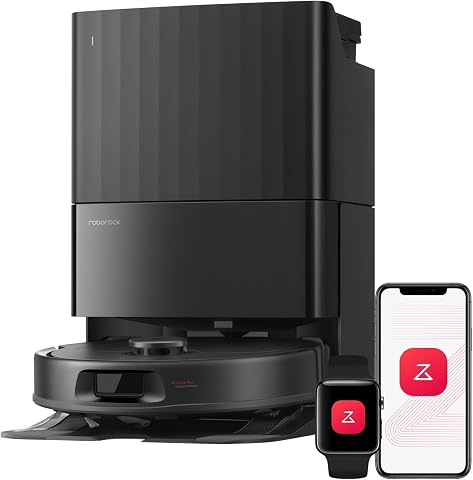
roborock Qrevo S Pro Robot Vacuum and Mop
- ✔ Weight: 10.6 lbs
- ✔ Dimensions: 13.8 x 13.8 x 4.4 inches
- ✔ Charging Time: Approx. 4 hours

4 Pack Washable Filter
- ✔ Weight: Approx. 2 oz per filter
- ✔ Dimensions: Standard HEPA size
- ✔ Reusability: Up to 9 weeks between replacements
roborock Qrevo S Pro Robot Vacuum and Mop
The Roborock Qrevo S Pro Robot Vacuum and Mop offers powerful suction, self-cleaning features, and a multifunctional dock that makes cleaning and maintenance straightforward. Its all-in-one cleaning station reduces manual effort and keeps your device in peak condition.
Pros:
- Powerful 18,500Pa suction
- Automatic dust and mop self-cleaning
- Warm air drying for mop readiness
- Smart obstacle avoidance
Cons:
- Requires regular filter cleaning
- Self-cleaning dock is relatively large
- Might be overkill for small spaces
Best for: Pet owners and busy households seeking low-maintenance cleaning
Not ideal for: Users looking for a less automated, manual cleaning approach
Bottom line: A top-tier robot vacuum with automated cleaning features that make maintenance easy.
4 Pack Washable Filter
This washable filter pack ensures your Roborock maintains optimal filtration, improving air quality and cleaning efficiency. Easy to replace and clean, it’s a smart choice for ongoing maintenance.
Pros:
- Compatible with multiple models
- Washable and reusable
- True HEPA filtration
- Simple to install
Cons:
- Not OEM, but performs well
- Requires regular washing
- Limited to compatible models
Best for: Maintaining clean filters for pet homes and allergy sufferers
Not ideal for: If you prefer OEM filters, consider official replacements
Bottom line: A cost-effective solution for maintaining filter efficiency and air quality.
Frequently Asked Questions
How often should I clean the dustbin?
It’s best to empty the dustbin after every use or at least once a week for optimal performance.
Can I wash the mop pads in the washing machine?
Yes, the microfiber mop pads are washable and can be cleaned in a washing machine, then air dried before reuse.
What should I do if the self-cleaning dock is not working?
Check for obstructions or debris in the dock and ensure the dust bag is not full. Restart the dock if necessary and contact support if problems persist.
Is it safe to clean sensors with water?
No, use a dry microfiber cloth to clean sensors and cameras. Avoid water contact to prevent damage.
Maintain Your Roborock S8 Pro Ultra with Ease
Regular cleaning and maintenance of your Roborock S8 Pro Ultra ensure it continues to perform at its best. Follow these simple steps and tips to keep your device running smoothly, saving you time and effort while enjoying a spotless home.
Affiliate disclosure: As an Amazon Associate we earn from qualifying purchases. Prices and availability are accurate as of the time of publishing.