
TL;DR

Get cleaning gear delivered free with Prime
- Fast, free delivery on millions of items
- Prime Video, Amazon Music and more included
- Member-only deals all year
Apple has announced HomeView, its first smart home display, and The Verge’s Jennifer Pattison Tuohy tested several features ahead of its release. The 7-inch device costs $299, is available for preorder and is scheduled to ship Nov. 13; some Siri features were demonstrated rather than tested firsthand.
Apple has announced HomeView, its first smart home display, and The Verge’s Jennifer Pattison Tuohy has tried the device ahead of its release. The $299, 7-inch display is designed to control connected home devices, run Siri and serve as a household hub; Apple says it will begin shipping Nov. 13.
In her hands-on report, Tuohy described a square Liquid Retina touchscreen that she found bright and responsive. A compact aluminum base houses the speaker, while the display can sit on a countertop or be mounted on a wall. Users can swipe among display “faces,” including options modeled on Apple Watch faces, and access widgets and apps.
The Home Widget brings controls from Apple’s Home app onto the larger screen. Tuohy said she used it to operate a thermostat and door lock, activate a scene and view live feeds from HomeKit Secure Video cameras. When she tried to unlock a door, the device asked her to authenticate with her face or iPhone. Apple also showed camera controls and an interface for FaceTime that uses Center Stage to keep callers framed.
Several of the most advanced Siri functions were shown in demonstrations, rather than tested directly by Tuohy. In one, Siri used information in a message and a travel-time estimate to schedule a coffee maker to turn on before a visitor arrived. In another, it found a song mentioned in a friend’s text. Tuohy also tested a cooking feature that transfers a recipe from an iPhone using Handoff and displays steps with in-line timers.
A New Screen for Apple Home
HomeView gives Apple customers a dedicated, walk-up control point for connected devices, cameras and household routines, rather than requiring them to reach for an iPhone or use voice commands alone. Its wall-mounted option could make smart-home controls more accessible in a shared space, while the countertop version adds video calling and cooking guidance to the same device.
The most consequential pitch is the connection between personal information and home automation: a request involving a message, an arrival time and a household appliance could link tasks that otherwise require separate steps. But that capability was presented in a demo, so its everyday reliability and limits have not yet been established by this hands-on report.
Products Worth Considering

Hisense E6SR Series 55-Inch 4K UHD Hi-QLED Roku Smart TV
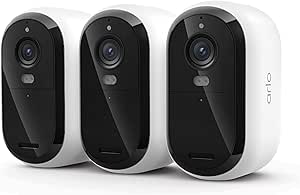
Arlo Essential Wireless Security Camera 2K (3rd Gen) – 3-Cam Kit with Yard Sign

Philips Hue Play Gradient 65-Inch Smart TV Light Strip
As an affiliate, we earn on qualifying purchases.
How HomeView Uses Apple Home
The Home Widget is described as a larger-screen version of controls available in Apple’s Home app on iPhone. The report says the display offers HomeKit Secure Video feeds and access to nearby accessories from a camera view. Sensitive actions are not necessarily one-tap: the door-unlock attempt prompted an additional identity check.
HomeView also borrows interaction patterns from other Apple devices. Swiping changes faces and opens features, while a control center appears from the top of the screen. Apps on the display populate from the user’s phone, according to the report. For recipes, Apple says most recipes using Google formatting should work with the Handoff feature.
“The screen almost entirely hides the small aluminum base that acts as a speaker.”
— Jennifer Pattison Tuohy, The Verge
Siri Features Await Testing
The report describes a limited hands-on session, and Tuohy said she did not personally test Siri’s use of messages and calendar context. The demonstrations do not establish how consistently the feature will interpret requests, what information it can access in different settings or how it handles mistakes.
Other practical details remain open in the source material, including how well recipe transfer works with formats outside those Apple cited, how the device performs over extended use and whether every feature shown will be available at launch. The report does not provide battery details, because the device is presented as a household display, or a fuller account of compatibility beyond Apple Home and HomeKit Secure Video.
Preorders Before November Shipping
Apple has made HomeView available for preorder at $299 and lists Nov. 13 as the start of shipping. The next useful test will be whether the features shown in demonstrations work reliably in homes, particularly Siri’s use of personal context and its ability to turn that information into timed home routines.
Tuohy said she had tried only a few features and was looking forward to testing more. Further hands-on reporting can clarify how the display performs beyond a brief preview, including recipe compatibility, camera and accessory controls, and the practical differences between its wall-mounted and tabletop versions.
Key Questions
What is Apple HomeView?
HomeView is Apple’s announced 7-inch smart home display. It is designed to control Apple Home devices, run Siri, show camera feeds and support features such as FaceTime and guided cooking.
How much does HomeView cost, and when does it ship?
The reported price is $299. Apple has opened preorders, with shipping scheduled to begin Nov. 13.
What smart home controls did the hands-on report test?
Jennifer Pattison Tuohy said she used the Home Widget to control a thermostat and door lock, activate a scene and view HomeKit Secure Video camera feeds. The door-unlock attempt required face or iPhone authentication.
Did the reporter test Siri’s personal-context features?
No. Tuohy said she watched a demonstration in which Siri used information from a message and a travel estimate to schedule an appliance routine, but did not test that feature herself.
Can HomeView show recipes from an iPhone?
The report says a recipe can be transferred from an iPhone using Handoff and reformatted into onscreen steps with timers. Apple says most recipes using Google formatting should work; compatibility with other recipe sources is not established in the report.
Source: rss