For most rental property turnovers, I’d start with the Kwikset SmartCode 917: its keypad deadbolt and handle set make it a practical choice for replacing keys between occupants. The TEEHO TE001 is a simpler keypad deadbolt alternative, while the Veise VE027-K stands out for owners who want Wi-Fi and fingerprint access. The main tradeoffs are how quickly access codes can be changed, whether you need remote management, and how much setup and upkeep you’ll accept. Handle-and-knob models, deadbolts, and mechanical locks also differ in fit and access methods. Read on for the full comparison and guidance on matching a lock to your turnover routine.

Get cleaning gear delivered free with Prime
- Fast, free delivery on millions of items
- Prime Video, Amazon Music and more included
- Member-only deals all year
Complete the kit


Key Takeaways
- The Kwikset SmartCode 917 is the strongest all-around fit in this lineup for owners who want a keypad deadbolt paired with a handle, rather than a standalone deadbolt.
- The TEEHO TE001 keeps the setup focused on keypad entry; its two listed finishes are variations of the same model, not different feature sets.
- The Veise VE027-K is the standout connected option for buyers drawn to Wi-Fi and fingerprint access, but extra access methods bring more setup and maintenance than a basic keypad.
- Fingerprint and keypad handle locks are not interchangeable with deadbolts; confirm the door’s existing hardware and intended level of security before choosing a knob or lever replacement.
- The Bravex mechanical keypad and Colosus multi-access lock serve different priorities: reduced reliance on batteries versus a broader mix of entry methods.
| Kwikset SmartCode 917 Traditional Electronic Deadbolt with Tustin Handle |  | Best for Fast Rekeying Between Tenants | Brand: Kwikset | Model: 99170-001 | Access: Keypad; up to 30 user codes | VIEW ON AMAZON | See Our Full Breakdown |
| Smart Door Handle Lock with Keypad, Yamiry Fingerprint Knob for Front Door |  | Best for Remote Access Flexibility | Brand: Yamiry | Model: YR01 | Access methods: Fingerprint, Bluetooth app, passcode, key fob, mechanical key, Alexa voice control | VIEW ON AMAZON | See Our Full Breakdown |
| Nyboer H01A Keypad Door Lock with Handle |  | Best for One-Time Guest Codes Without an App | Brand and model: Nyboer H01A | Access methods: Passcodes and mechanical keys | Password capacity: Up to 20 custom passwords | VIEW ON AMAZON | See Our Full Breakdown |
| NICE DIGI Keypad Door Lock with Handle |  | Best for App-Free Simplicity | Brand and model: NICE DIGI Z1A | Access codes: Up to 20 personalized codes, 4–8 digits | Auto-lock timer: 5–99 seconds | VIEW ON AMAZON | See Our Full Breakdown |
| Hicarer Commercial Keyless Door Lock with Keypad Lever – Silver (1 Pack) |  | Best for Card-Based Shared Access | Brand and model: Hicarer ZHW-Hicarer-2160 | Access methods: Personal code, access card, backup key | Materials: Stainless steel and zinc alloy | VIEW ON AMAZON | See Our Full Breakdown |
| Sifely S Fingerprint Smart Door Lock with Handle and Keypad |  | Best for Flexible Guest Access | Lock type: Deadbolt | Entry methods: Fingerprint, keypad, app, FOB, physical key | Connectivity: Bluetooth; Wi-Fi via optional gateway | VIEW ON AMAZON | See Our Full Breakdown |
| Veise VE001 Keyless Entry Deadbolt with Keypad, Satin Nickel |  | Best for Simple, Code-Based Turnovers | Entry methods: Keypad codes and backup keys | Maximum user codes: 20 | Auto-lock timer: 10–99 seconds; disabled by default | VIEW ON AMAZON | See Our Full Breakdown |
| Yamiry Smart Door Knob Lock with Fingerprint Keyless Entry |  | Best for High-Capacity Biometric Sharing | Model: YR05 | Lock type: Deadbolt | Entry methods: Fingerprint, password, key fob, app, physical key | VIEW ON AMAZON | See Our Full Breakdown |
| Evanshow Biometric Door Knob with Keypad, Silver |  | Best for Large Local Biometric Rosters | Model: 190NOSilver | Unlock methods: Fingerprint, password, IC card, mechanical key | Fingerprint capacity: Up to 100 | VIEW ON AMAZON | See Our Full Breakdown |
| Veise VE027-K Wi-Fi Fingerprint Smart Deadbolt Lock Set, Matte Black |  | Best for Remote Turnover Management | Connectivity: Built-in 2.4 GHz Wi-Fi; no hub required | Entry methods: App, fingerprint, IC card, PIN, key, voice control, user authorization, code sharing | Fingerprint capacity: Up to 20 | VIEW ON AMAZON | See Our Full Breakdown |
| Yamiry YR04 Keypad Smart Door Knob Lock | 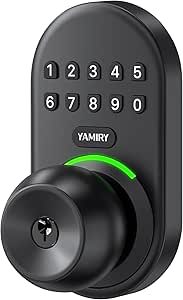 | Best for Flexible Guest Codes | Model: YR04 | Lock type: Keypad door knob | User codes: Up to 20 | VIEW ON AMAZON | See Our Full Breakdown |
| TEEHO TE001 Keyless Entry Deadbolt with Keypad, Satin Nickel |  | Best Value for Straightforward Turnovers | Model: TE001 | Finish: Satin nickel | Access codes: Up to 20 user codes and one temporary single-use code | VIEW ON AMAZON | See Our Full Breakdown |
| Bravex Mechanical Keypad Deadbolt Lock, Zinc Alloy, Black |  | Best Battery-Free Option | Model: MKD-001ZB-84 | Lock type: Mechanical keypad deadbolt | Material: Zinc alloy | VIEW ON AMAZON | See Our Full Breakdown |
| Colosus Keyless Entry Door Lock with Keypad, RFID Fobs, Remote, and Keys |  | Best for Multiple Entry Methods | Entry methods: PIN code, RFID key fob, remote control, metal key | PIN-code capacity: Up to 50 users | RFID capacity: Up to 50 users | VIEW ON AMAZON | See Our Full Breakdown |
| TEEHO TE001 Keyless Entry Deadbolt with Keypad, Bronze |  | Best Bronze-Finish Alternative | Model: TE001 | Finish: Bronze | Access codes: Up to 20 user codes | VIEW ON AMAZON | See Our Full Breakdown |
| keyless door lock for rental property turnover | Model |
|---|---|
| Kwikset SmartCode 917 Traditio | 99170-001 |
| Smart Door Handle Lock with Ke | YR01 |
| Nyboer H01A Keypad Door Lock w | — |
| NICE DIGI Keypad Door Lock wit | — |
| Hicarer Commercial Keyless Doo | — |
| Sifely S Fingerprint Smart Doo | — |
| Veise VE001 Keyless Entry Dead | — |
| Yamiry Smart Door Knob Lock wi | YR05 |
| Evanshow Biometric Door Knob w | 190NOSilver |
| Veise VE027-K Wi-Fi Fingerprin | — |
| Yamiry YR04 Keypad Smart Door | YR04 |
| TEEHO TE001 Keyless Entry Dead | TE001 |
| Bravex Mechanical Keypad Deadb | MKD-001ZB-84 |
| Colosus Keyless Entry Door Loc | — |
| TEEHO TE001 Keyless Entry Dead | TE001 |
More Details on Our Top Picks
Kwikset SmartCode 917 Traditional Electronic Deadbolt with Tustin Handle
For owners who need to change physical key access between stays, the SmartKey re-keying feature is this lock’s clearest advantage: you can re-key it yourself rather than call a locksmith. It also holds up to 30 user codes, giving a property manager room to assign separate access to residents or service workers, while auto-lock timing and vacation mode add useful control. Compared with the Nyboer H01A, the Kwikset offers a larger stated code capacity and simpler key changes, but its listed features do not include one-time visitor codes. The keypad’s one-minute lockout after three incorrect attempts can slow a legitimate guest, and the four AA batteries are not included. I’d choose it for a turnover workflow that values rekeying flexibility over app-based remote access.
Pros:- SmartKey lets owners re-key without hiring a locksmith.
- Stores up to 30 user codes.
- Adjustable auto-lock timing and vacation mode support turnover security.
- Low-light keypad illumination helps guests enter after dark.
Cons:- Four AA batteries are required and not included.
- Three incorrect entries trigger a one-minute keypad lockout.
- No app-based remote access or one-time code feature is specified.
Best for: Landlords who want to re-key the physical lock themselves between tenants and manage multiple keypad codes.
Not ideal for: Hosts who need remote code changes or one-time guest codes, since app or Wi-Fi access is not listed.
- Brand:Kwikset
- Model:99170-001
- Access:Keypad; up to 30 user codes
- Rekeying:SmartKey security
- Auto-lock:Multiple timing options
- Power:4 AA alkaline batteries, not included
- Stated battery life:12 months
- Warranty:Lifetime mechanical and finish; 1 year electronics
Our verdict“Choose the SmartCode 917 if easy physical rekeying matters more to your turnover process than remote guest-code management.”
Smart Door Handle Lock with Keypad, Yamiry Fingerprint Knob for Front Door
The Yamiry is the most access-method-rich pick in this group: guests can use fingerprint, app, passcode, key fob, or mechanical key, while owners can manage permanent, temporary, and one-time codes through the app. That mix can reduce handoffs of physical keys during frequent turnovers. Compared with the NICE DIGI Z1A, which works without an app and supports up to 20 codes, Yamiry offers remote management and more entry choices, but adds smartphone dependence and setup overhead. Alexa voice control requires a separate Wi-Fi gateway, so it is not a ready-to-use feature out of the box. Its stated fit is for standard American wooden doors, and it installs without drilling; buyers should still check their door before ordering. This suits tech-comfortable hosts managing access remotely, not owners seeking a simple standalone keypad.
Pros:- Six listed unlocking methods provide flexibility for guests and owners.
- App supports temporary and one-time codes plus unlock logs.
- Remote access management can reduce in-person key exchanges.
- Reversible handle and no-drill installation suit many standard wooden doors.
Cons:- Alexa voice control requires a Wi-Fi gateway sold separately.
- App-based management may be inconvenient for owners or guests who avoid smartphones.
- Only two mechanical keys are included.
Best for: Short-term rental hosts who manage guest codes remotely and want multiple entry options, including fingerprint and key fobs.
Not ideal for: Landlords who prefer a no-app lock or need Alexa voice access without buying a separate Wi-Fi gateway.
- Brand:Yamiry
- Model:YR01
- Access methods:Fingerprint, Bluetooth app, passcode, key fob, mechanical key, Alexa voice control
- Code management:Permanent, temporary, and one-time codes
- Remote access:App-based; Alexa requires a separate Wi-Fi gateway
- Included key fobs:2
- Included mechanical keys:2
- Installation:Reversible handle; described as no-drill installation for standard American wooden doors
Our verdict“Pick Yamiry if you want remote turnover control and multiple entry methods, and are comfortable relying on its app.”
Nyboer H01A Keypad Door Lock with Handle
The H01A is a straightforward choice for owners who want guest access to change without tying the lock to a phone or network. It supports up to 20 custom passwords and one-time visitor codes, so a cleaner or short-stay guest can receive a code without sharing a permanent one. Compared with the NICE DIGI Z1A, it has the same stated 20-code capacity and similar auto-lock timing, but Nyboer specifically lists one-time visitor codes and IP65 weather resistance. Its app-free design also means no remote code changes or access logs, a meaningful limitation for off-site management. The adjustable fit covers a range of door thicknesses and common hole sizes, though owners should verify both before installation. I’d favor it for hands-on landlords who want simple, weather-resistant keypad access.
Pros:- Supports up to 20 custom passwords and one-time visitor codes.
- IP65 weather resistance is a stronger stated rating than the NICE DIGI Z1A’s IP54.
- Installs with a screwdriver without drilling or app setup.
- Adjustable auto-lock delay and low-battery reminders help with routine property upkeep.
Cons:- No app, Wi-Fi, or remote access management.
- Four AA batteries are required and not included.
- The one-year warranty is shorter than the NICE DIGI Z1A’s stated two-year warranty.
Best for: Small-property landlords who want to issue one-time visitor codes locally without installing an app or Wi-Fi system.
Not ideal for: Remote operators who need to create or revoke guest codes while away from the property.
- Brand and model:Nyboer H01A
- Access methods:Passcodes and mechanical keys
- Password capacity:Up to 20 custom passwords
- Password length:4–8 digits
- One-time visitor codes:Supported
- Weather resistance:IP65
- Power and stated battery life:4 AA batteries, not included; 8–12 months
- Door fit:1-3/8–2 in thick; 1-1/2 or 2-1/8 in hole diameter
- Warranty:1 year
Our verdict“Choose the Nyboer H01A if one-time codes and weather resistance matter more than remote management or a longer stated warranty.”
NICE DIGI Keypad Door Lock with Handle
The NICE DIGI keeps turnover access simple: set personalized codes, hand a guest a temporary code, and avoid app accounts, wireless setup, or connectivity troubleshooting. Its passage mode is useful when a door needs to stay unlocked during a service visit, while auto-lock timing restores routine locking afterward. Compared with the Nyboer H01A, it shares a 20-code capacity and similar installation approach, but the Nyboer lists one-time visitor codes and a higher weather-resistance rating. NICE DIGI instead offers a two-year warranty and IP54 protection. Since it has no app or Wi-Fi, owners cannot manage codes remotely; that tradeoff matters for off-site hosts. It is a sensible fit for a nearby landlord who wants keypad access and straightforward upkeep, rather than a connected lock system.
Pros:- Works without an app, Wi-Fi, or Bluetooth.
- Supports up to 20 personalized codes and passage mode.
- Reversible handle fits most standard US and Canadian wooden doors.
- Two-year warranty and IP54 weather resistance are specified.
Cons:- No wireless or remote code management.
- Four AA batteries are required and not included.
- IP54 is a lower stated weather-resistance rating than the Nyboer H01A’s IP65.
Best for: Local landlords and small property managers who want temporary codes and passage mode without app or network setup.
Not ideal for: Hosts who need remote code creation, access logs, or the higher IP65 weather rating listed for the Nyboer H01A.
- Brand and model:NICE DIGI Z1A
- Access codes:Up to 20 personalized codes, 4–8 digits
- Auto-lock timer:5–99 seconds
- Passage mode:Supported
- Backup keys:2
- Weather resistance:IP54
- Power and stated battery life:4 AA batteries, not included; 8–12 months
- Installation:Reversible handle; about 15 minutes; screwdriver installation
- Warranty:2 years
Our verdict“Choose NICE DIGI for uncomplicated local keypad access, but pick a connected option if you manage turnovers from off-site.”
Hicarer Commercial Keyless Door Lock with Keypad Lever – Silver (1 Pack)
Hicarer stands apart from the code-focused options by adding access-card entry alongside personal codes and a backup key. Cards can suit shared spaces where several authorized people need a familiar, quick way in, such as an apartment common door or small office. Compared with the Kwikset SmartCode 917, Hicarer offers cards but does not list SmartKey rekeying or a 30-code capacity; compared with the NICE DIGI Z1A, it adds cards but lacks stated auto-lock timing and weather resistance. Its stainless-steel and zinc-alloy construction and reversible lever are practical for varied door handing, but the fit requirements deserve careful checking: the listed bore is 55 mm and backset is 60 mm. There is no remote management or built-in power backup, so this is better for controlled shared access than remote short-stay turnover.
Pros:- Code, access-card, and backup-key entry give users different ways to enter.
- Reversible lever accommodates left- or right-handed doors.
- Standalone battery operation needs no Wi-Fi, app, or subscription.
- Stainless-steel and zinc-alloy construction with mounting hardware included.
Cons:- No remote management or smart-home integration is listed.
- No built-in power backup is specified.
- Door measurements and drilling may need careful attention, including the 55 mm bore and 60 mm backset.
Best for: Owners of small offices, apartment shared spaces, or rentals where residents and staff can use access cards at the door.
Not ideal for: Short-term rental hosts who need remote code changes, detailed turnover controls, or a lock with specified weather resistance.
- Brand and model:Hicarer ZHW-Hicarer-2160
- Access methods:Personal code, access card, backup key
- Materials:Stainless steel and zinc alloy
- Door thickness compatibility:1.18–2.36 in
- Backset:2.36 in / 60 mm
- Bore hole diameter:2.17 in / 55 mm
- Power:Standalone battery operation
- Lever fit:Reversible for left- or right-handed doors
- Included components:Lock set, access cards, backup key, screwdriver, mounting hardware
Our verdict“Pick Hicarer for local shared access where cards are useful, but skip it if your turnovers depend on remote guest-code management.”
Sifely S Fingerprint Smart Door Lock with Handle and Keypad
For turnovers where guests or cleaners may not all be comfortable with the same entry method, the Sifely S offers fingerprint, keypad, app, FOB, and physical-key access. Its app supports guest codes, user management, and access logs, making it easier to assign and track entry across multiple people than with the keypad-only Veise VE001. The reversible handle and DIY design also suit many standard doors without extra drilling, though I would verify door fit before ordering. The main limitation is connectivity: Bluetooth supports local app use, while remote unlocking and voice control require a separate Wi-Fi Gateway. That makes it less ready for off-site turnover management than the Veise VE027-K, which has built-in Wi-Fi, but more adaptable for properties where several entry methods matter more than remote access.
Pros:- Offers fingerprint, keypad, app, FOB, and physical-key entry
- App includes guest-code management, user management, and access logs
- Reversible handle suits left- or right-hand doors
- Designed for DIY installation on most standard doors without extra drilling
Cons:- Remote access and voice control require a separately sold Wi-Fi Gateway
- Fit may vary because compatibility is described for most standard doors
- The one-year warranty is limited compared with some longer-coverage options
Best for: Hosts and small property managers who want several ways to admit guests, cleaners, and maintenance staff and can manage the lock nearby over Bluetooth.
Not ideal for: Owners who need remote code changes or unlocking without buying an additional gateway, or whose doors may not match standard installation dimensions.
- Lock type:Deadbolt
- Entry methods:Fingerprint, keypad, app, FOB, physical key
- Connectivity:Bluetooth; Wi-Fi via optional gateway
- Smart-home compatibility:Alexa and Google Assistant via optional Wi-Fi Gateway
- Material and finish:Zinc; satin nickel
- Dimensions:7 x 3 x 1.12 inches
- Included access items:2 keys and 2 key cards
- Warranty:One year
Our verdict“Choose the Sifely S if varied entry methods and guest management matter more than having remote access built in.”
Veise VE001 Keyless Entry Deadbolt with Keypad, Satin Nickel
The Veise VE001 keeps turnover access straightforward: create user codes or one-time codes, share them with incoming occupants, then change access when a stay ends. Its capacity of 20 user codes is a practical fit for a single rental or a small team, while the backlit keypad and anti-peeping entry help guests use it after dark. Unlike the Sifely S, it has no fingerprint, FOB, or app-based user management, so it suits owners who prefer a simpler keypad routine over multiple access channels. The 10–99 second auto-lock timer can reduce the chance of an unlocked door, but it is disabled by default and needs setup. It also lacks remote management, so it is less suited to owners who need to update access from off-site than the Wi-Fi-enabled Veise VE027-K.
Pros:- Supports up to 20 user codes and one-time codes
- Backlit keypad includes anti-peeping password entry
- Auto-lock timer can be set from 10 to 99 seconds
- Includes two backup keys and is designed for DIY installation
Cons:- No app or remote access for off-site turnover changes
- Four AA batteries are required and are not included
- Auto-lock is disabled by default and must be configured
Best for: Owners of a single rental who want temporary and recurring keypad codes without managing an app or biometric users.
Not ideal for: Remote hosts who need to change codes away from the property, or managers who need fingerprint entry or more than 20 user codes.
- Entry methods:Keypad codes and backup keys
- Maximum user codes:20
- Auto-lock timer:10–99 seconds; disabled by default
- Power:4 AA batteries, not included
- Battery life:Up to 13 months under normal use
- Weather resistance:IP55
- Door compatibility:Standard US doors with 2-1/8-inch (54 mm) holes
- Warranty:1 year; extendable to 2 years with registration
Our verdict“Pick the VE001 for uncomplicated code-based turnovers when local keypad access is enough.”
Yamiry Smart Door Knob Lock with Fingerprint Keyless Entry
With room for up to 50 passwords or fingerprints, the Yamiry YR05 is a better match for a rental with frequent guest, cleaner, or contractor changes than the Veise VE001, which supports up to 20 user codes. It also gives people a choice of fingerprint, password, key fob, app, or physical key, so guests are not locked into one way of entering. The Bluetooth app handles nearby programming; remote control requires an optional Wi-Fi gateway. That split makes it less convenient for off-site managers than the Veise VE027-K, whose Wi-Fi is built in. The aluminum body and screwdriver-only installation are appealing for a straightforward door replacement, but the listing identifies the lock type as a deadbolt despite its knob-style product name, so I would confirm the hardware configuration before buying for a specific door.
Pros:- Stores up to 50 passwords or fingerprints and key fobs
- Offers fingerprint, password, key fob, app, and physical-key entry
- Aluminum construction is described as corrosion-resistant
- Designed for standard American doors with screwdriver-only installation
Cons:- Remote access requires a separately sold Wi-Fi gateway
- Bluetooth connection does not provide built-in off-site management
- Product naming and listed lock type may require configuration verification
Best for: Hosts and small managers who regularly rotate many guest and staff credentials and want fingerprint access alongside codes and fobs.
Not ideal for: Owners who need built-in remote management, do not want to rely on app setup, or need a clearly specified knob-versus-deadbolt configuration.
- Model:YR05
- Lock type:Deadbolt
- Entry methods:Fingerprint, password, key fob, app, physical key
- Credential capacity:Up to 50 passwords/fingerprints and key fobs
- Connectivity:Bluetooth; remote control via optional Wi-Fi gateway
- Material and color:Aluminum; matte black
- Dimensions:5.62 x 2.69 x 3 inches
- Included items:2 physical keys and 2 key fobs
Our verdict“Choose the Yamiry YR05 when credential capacity and multiple entry methods outweigh built-in remote access.”
Evanshow Biometric Door Knob with Keypad, Silver
The Evanshow is the capacity pick for properties that need many local users: it stores up to 100 fingerprints and 50 passwords, more biometric entries than the Yamiry YR05’s stated capacity. Fingerprint, password, IC card, and mechanical-key access give guests alternatives, while the no-drilling, no-wiring installation can simplify fitting it to a suitable wooden door. The tradeoff is that this is a locally managed knob lock, not an app-connected remote system like the Veise VE027-K. A manager must register an administrator fingerprint before first use, adding a setup step before handoff. Its USB port offers emergency power from an external power bank, but does not recharge the internal batteries, so it should not be mistaken for a charging solution. Check the listed door thickness range before choosing it.
Pros:- Stores up to 100 fingerprints and 50 passwords
- Offers fingerprint, password, IC card, and mechanical-key entry
- Designed to install without drilling or wiring
- Reversible knob orientation suits either hand
Cons:- Administrator fingerprint must be registered before first use
- USB emergency-power port does not charge the internal batteries
- No app or remote access is specified for off-site turnover management
Best for: Property managers who need many fingerprint credentials on a compatible wooden door and can administer the lock at the property.
Not ideal for: Remote hosts who need app-based access changes, or owners whose doors fall outside the specified thickness range or need deadbolt hardware.
- Model:190NOSilver
- Unlock methods:Fingerprint, password, IC card, mechanical key
- Fingerprint capacity:Up to 100
- Password capacity:Up to 50
- Door thickness:1.18–1.97 inches
- Installation:No drilling or wiring
- Emergency power:USB port for external power bank; does not charge internal batteries
- Handle and orientation:Knob; reversible
- Material and color:Metal; silver
Our verdict“Choose the Evanshow for a compatible wooden door when high local fingerprint capacity matters more than remote control.”
Veise VE027-K Wi-Fi Fingerprint Smart Deadbolt Lock Set, Matte Black
For a host changing access between stays from elsewhere, the Veise VE027-K is the most directly equipped option in this group: built-in 2.4 GHz Wi-Fi supports app control without a separate gateway, alongside activity alerts and code sharing. That makes it more convenient for remote turnover work than the Bluetooth-only Sifely S and Yamiry YR05, which need an optional gateway for remote access. It also offers fingerprint, IC card, PIN, key, and voice entry, with capacity for 100 passcodes but only 20 fingerprints. The 10–180 second auto-lock range adds flexibility for guest routines, and its IP65 rating suits more exposed locations than the Veise VE001’s IP55 rating. The main upkeep tradeoff is eight AA batteries, not included, with listed battery life of up to 240 days.
Pros:- Built-in 2.4 GHz Wi-Fi enables app management without a separate hub
- Supports activity alerts, code sharing, and Alexa and Google Assistant
- Stores up to 100 passcodes and supports several entry methods
- IP65 weather resistance and adjustable auto-lock interval
Cons:- Requires eight AA batteries, which are not included
- Fingerprint capacity is limited to 20 users
- Listed battery life is up to 240 days, so battery changes may be more frequent than with some simpler locks
Best for: Remote hosts and property managers who need to issue or manage access codes off-site and want alerts and multiple entry methods.
Not ideal for: Owners who want low battery upkeep, need more than 20 fingerprint users, or prefer a lock that does not rely on Wi-Fi.
- Connectivity:Built-in 2.4 GHz Wi-Fi; no hub required
- Entry methods:App, fingerprint, IC card, PIN, key, voice control, user authorization, code sharing
- Fingerprint capacity:Up to 20
- Passcode capacity:Up to 100
- Auto-lock interval:10–180 seconds
- Power and battery life:8 AA batteries, not included; up to 240 days
- Weather resistance and security grade:IP65; BHMA/ANSI Grade 3
- Compatible door thickness:1-3/8 to 2 inches
- Warranty:1-year limited warranty, with 1-year extension through product registration
Our verdict“Pick the VE027-K if off-site access management is your priority and you are prepared to maintain its eight-battery setup.”
Yamiry YR04 Keypad Smart Door Knob Lock
The Yamiry YR04 is a practical fit for owners who want several separate entry codes without moving to a more involved smart-lock setup. Its capacity of up to 20 codes, including one-time guest codes, gives a host options for cleaners, contractors, and incoming guests. The backlit keypad helps with nighttime entry, while adjustable auto-lock timing can reduce the chance that a departing guest leaves the door unsecured. Compared with the TEEHO TE001 deadbolts, this is a knob-style option, so buyers should confirm that a knob lock suits their door and security needs. Its Wi-Fi specification does not come with stated app-control details, so I would not choose it for remote code management. The limited compatibility information also makes measuring and checking the door before installation especially important.
Pros:- Supports up to 20 user codes and one-time guest codes
- Backlit keypad aids entry in low light
- Adjustable auto-lock can be set from 5 to 99 seconds or disabled
- Includes two backup keys and has an IP54 weather-resistance rating
Cons:- No app-control functions are specified despite the Wi-Fi listing
- Compatibility details are limited, so door fit needs checking
- A knob-style lock may not suit buyers seeking a keypad deadbolt
Best for: Rental owners who want up to 20 keypad codes and one-time guest access on a compatible knob-lock door.
Not ideal for: Hosts who need confirmed app-based remote management, or owners whose door hardware compatibility is uncertain.
- Model:YR04
- Lock type:Keypad door knob
- User codes:Up to 20
- Code length:4–8 digits
- Auto-lock timing:5–99 seconds; can be disabled
- Weather resistance:IP54
- Backup keys:2
- Connectivity:Wi-Fi
Our verdict“Choose the Yamiry YR04 if flexible keypad access matters more than confirmed remote control and your door is suited to a knob lock.”
TEEHO TE001 Keyless Entry Deadbolt with Keypad, Satin Nickel
The satin-nickel TEEHO TE001 prioritizes the core turnover routine: assign guest access, set the door to lock itself, and keep physical keys as a fallback. It supports up to 20 user codes plus a temporary single-use code, which is more useful for a short visit than handing out a reusable code. One-touch locking offers a quick way to secure the door on departure; compared with the Bravex Mechanical Keypad Deadbolt, the TE001 adds automatic locking but depends on batteries. A low-battery alert gives owners a warning, though the four AA batteries are not included. Its listed battery life is up to 365 days, not a guarantee for every property’s usage. Check the required 2-1/8-inch door hole before ordering, since it is not compatible with 38 mm holes.
Pros:- Provides up to 20 user codes and a temporary single-use code
- Offers adjustable auto-lock and one-touch locking
- Low-battery indicator helps owners plan battery replacement
- Includes two backup keys and a two-year warranty
Cons:- Four AA batteries are required and not included
- Not compatible with 38 mm door holes
- Battery-life figure is stated as up to 365 days and may vary with use
Best for: Rental hosts seeking a conventional keypad deadbolt with temporary guest access, auto-lock, and backup keys.
Not ideal for: Owners with a 38 mm door hole or those who prefer a lock that operates without batteries.
- Model:TE001
- Finish:Satin nickel
- Access codes:Up to 20 user codes and one temporary single-use code
- Auto-lock:Adjustable from 10 to 99 seconds; one-touch locking
- Power:4 AA batteries, not included
- Claimed battery life:Up to 365 days
- Weather resistance:IP54
- Door hole size:2-1/8 inches (54 mm)
- Warranty:2 years
Our verdict“Pick the satin-nickel TE001 for a familiar keypad deadbolt with one-time guest codes, provided your door matches its hole-size requirement.”
Bravex Mechanical Keypad Deadbolt Lock, Zinc Alloy, Black
The Bravex Mechanical Keypad Deadbolt trades electronic convenience for a simple benefit during turnovers: no batteries to replace. Guests can enter a 4–8 digit combination or use a key, and the lock supports left- or right-handed doors. That makes it a different kind of choice from the electronic TEEHO TE001, which offers temporary codes and automatic locking but relies on batteries. Bravex’s main limitation is the manual routine: it does not lock automatically, so guests must operate the deadbolt when leaving. The combination digits also cannot repeat, which narrows code choices. For an owner who values battery independence over temporary guest codes and auto-lock, this mechanical design can reduce one recurring maintenance task; hosts wanting more turnover-specific control should favor the TEEHO instead.
Pros:- Mechanical operation requires no batteries
- Can be opened by combination or physical key
- Fits left- or right-handed doors
- Combination can be entered in any order
Cons:- Does not lock automatically
- Combination digits cannot repeat
- Requires a prepared door within the stated thickness and bore dimensions
Best for: Rental owners who want a battery-free keypad deadbolt and can remind guests to lock the door manually.
Not ideal for: Hosts who need automatic relocking, temporary single-use guest codes, or greater flexibility when choosing combinations.
- Model:MKD-001ZB-84
- Lock type:Mechanical keypad deadbolt
- Material:Zinc alloy
- Combination length:4–8 digits
- Door thickness:1.38–1.96 inches
- Maximum borehole diameter:2-1/8 inches
- Power:No batteries required
- Door handing:Left- or right-handed
Our verdict“Choose Bravex when avoiding battery maintenance matters more than auto-lock and one-time guest-code features.”
Colosus Keyless Entry Door Lock with Keypad, RFID Fobs, Remote, and Keys
The Colosus Keyless Entry Door Lock suits rentals where guests or staff may prefer different ways to enter: PIN, RFID fob, remote control, or metal key. Its capacity reaches 50 PIN users and 50 RFID users, making it more accommodating for a property with many recurring users than the 20-code TEEHO TE001. Auto-lock, peep-proof code entry, and an alarm after three incorrect attempts add useful access controls. The tradeoff is fit and placement: this is a mortise-bolt lock with a standard latch, not a deadbolt, and it is not waterproof. I would limit it to a compatible indoor or sheltered setting rather than a door exposed to rain. Installation calls for a compatible 35–60 mm door and drilling, so it is less straightforward than a screwdriver-install keypad deadbolt.
Pros:- Offers four entry methods: PIN, RFID fob, remote control, and metal key
- Supports up to 50 PIN users and 50 RFID users
- Includes auto-lock, peep-proof code entry, and an incorrect-entry alarm
- Comes with four key fobs, one remote, and two metal keys
Cons:- Not waterproof and not recommended for direct exposure to water
- Requires a compatible door and drilling for installation
- Four AA batteries are required and not included
- Uses a mortise bolt rather than a deadbolt
Best for: Owners of compatible indoor rentals who need PIN, fob, remote, and key access for a large group of recurring users.
Not ideal for: Hosts installing on an exposed exterior door, or those seeking a standard deadbolt with simple retrofit installation.
- Entry methods:PIN code, RFID key fob, remote control, metal key
- PIN-code capacity:Up to 50 users
- RFID capacity:Up to 50 users
- Remote control capacity:Up to 5 users
- Door thickness:35–60 mm (1.38–2.36 inches)
- Bolt type:Mortise bolt; standard 60 mm latch included
- Power:4 AA alkaline batteries, not included
- Operating temperature:14–122°F
- Included accessories:4 key fobs, 1 remote control, 2 metal keys
Our verdict“Choose Colosus for an indoor property that benefits from several access methods and a large user roster, not for a rain-exposed entry.”
TEEHO TE001 Keyless Entry Deadbolt with Keypad, Bronze
The bronze TEEHO TE001 keeps the same turnover-friendly function as the satin-nickel TE001: up to 20 access codes, a one-time guest code, adjustable auto-lock, one-touch locking, and two backup keys. Its place in this lineup is for owners whose door hardware calls for a bronze finish without changing the practical access setup. Compared with the Yamiry YR04, this is a deadbolt rather than a knob lock, with a clearly listed 2-1/8-inch door-hole requirement and a low-battery indicator. The shared TE001 limitation still applies: it needs four AA batteries, which are not included, and it will not fit 38 mm door holes. The stated battery life is up to 365 days, but hosts should treat that as a claim, not a fixed replacement schedule.
Pros:- Supports up to 20 user codes and one-time guest codes
- Provides adjustable auto-lock and one-touch locking
- Includes a low-battery indicator and two backup keys
- IP54 weather resistance and a two-year warranty
Cons:- Four AA batteries are required and not included
- Not compatible with 38 mm door holes
- No app-based remote management is specified
Best for: Hosts who want the TE001’s one-time guest access and auto-lock features in a bronze-finish keypad deadbolt.
Not ideal for: Owners with a 38 mm door hole, or buyers who want a battery-free lock or confirmed remote code management.
- Model:TE001
- Finish:Bronze
- Access codes:Up to 20 user codes
- Temporary guest code:One-time use
- Auto-lock delay:10–99 seconds
- Power:4 AA batteries, not included
- Claimed battery life:Up to 365 days
- Weather resistance:IP54
- Door hole size:2-1/8 inches (54 mm)
Our verdict“Choose the bronze TE001 when its finish suits your door and you want keypad turnover features without moving to a connected lock.”

How We Picked
I ranked these locks around the work that happens between tenants: changing access without exchanging keys, keeping entry straightforward for residents and service workers, and limiting the upkeep a property owner must handle. I compared access methods, product format, apparent management complexity, and how clearly each model suits a turnover routine. A keypad-first deadbolt or a deadbolt-and-handle set ranks ahead of more specialized options when it offers a practical balance without making connectivity or biometrics a requirement.
The order also reflects fit and tradeoffs, not a claim that every lock suits every door. Fingerprint and Wi-Fi models may add useful access options, but they also add setup and maintenance considerations; mechanical keypads avoid battery dependence but provide a different management experience. I treated the two TEEHO TE001 finishes as finish choices rather than separate levels of functionality. Since door preparation, handing, and compatibility vary, buyers should verify the manufacturer’s requirements before ordering.
Factors to Consider When Choosing Keyless Door Lock For Rental Property Turnovers
A good turnover lock is the one that fits your door and makes access changes manageable for your own operation. Before choosing from the product list, I’d settle how you issue access, who needs entry, and how much remote control is worth maintaining.
Choose the lock format that matches the door
Start with the hardware already on the door: a deadbolt, a keyed knob, or a combined handle set. A keypad deadbolt usually replaces only the deadbolt, while a knob or lever lock may replace the latch hardware and can change how the door is used. A handle-and-deadbolt set can make sense during a broader hardware refresh, but it may involve more installation work than replacing one component. Check door thickness, backset, bore-hole size, handing, and clearance against the product’s specifications before buying. A common mistake is choosing by access features first and discovering the lock does not match the existing prep. If a unit has an unusual door or shared entry hardware, confirm the fit with a locksmith or installer.
Plan how codes will be issued and removed
Write down your turnover process before deciding whether a basic keypad is enough. If staff can update a code at the door and you only manage a small number of units, a standalone keypad may be easier to operate than an app-based system. For several properties or frequent service visits, remote administration can reduce trips, but only if the lock and any required connection support the tasks you need. Check whether the product allows separate user codes, how codes are added or deleted, and whether you can verify a change. Avoid relying on one permanent code for tenants, cleaners, and contractors; that makes access harder to control when someone’s role ends. A clear code policy matters as much as the lock’s feature list.
Decide whether remote access pays for its upkeep
Wi-Fi and app features can help when you need to manage access away from the property, but they add a dependency on connectivity, account setup, and software support. Confirm whether remote control works directly or requires a separate hub, gateway, subscription, or compatible network; product names alone do not answer that. Also check what happens if the internet goes down, a phone is unavailable, or ownership of the property changes. If you mainly need a fresh entry code after each stay, local keypad programming may be less complicated. Pay for connected features when you have a specific management task they solve, not simply because remote control sounds convenient. Keep a documented fallback plan for access and account recovery.
Treat fingerprints as a convenience, not the turnover plan
Biometric entry can reduce the need to remember or share codes for regular occupants, but rental turnover still requires a reliable way to remove or replace access. Ask how stored fingerprints are deleted, who can manage them, and whether the lock also supports keypad or key entry. Fingerprints may be less convenient for guests who arrive with wet, dirty, or hard-to-read fingers, and every resident may not want to register biometric data. For short stays, a code can be simpler to communicate and revoke. Avoid choosing a fingerprint model without checking its fallback method and reset process. A secondary entry method can help prevent a minor sensor or setup issue from becoming a lockout.
Compare battery care with mechanical simplicity
Electronic locks need a battery-check routine, especially when a property sits vacant or staff visit infrequently. Check the manufacturer’s battery guidance, low-power warnings, and emergency entry provisions rather than assuming every model handles a depleted battery the same way. A mechanical keypad deadbolt avoids electronic battery dependence, which can suit a property where connectivity or routine monitoring is difficult. In exchange, it may not offer the same code-management tools or electronic access options. Keep any physical backup keys controlled and accounted for; a key left in an unmanaged lockbox can undermine the benefit of changing codes. The best choice depends on whether your operation can maintain batteries more easily than it can manage physical keys.
Check security, installation, and operating rules
Keyless entry changes how access is managed; it does not automatically make a door or frame more secure. Review the lock’s physical construction and installation requirements, then inspect the strike plate, screws, door alignment, and frame condition. A strong lock on a loose or poorly fitted door may not provide the protection you expect. For multi-unit buildings, check lease terms, building rules, fire-safety requirements, and any restrictions on changing shared or exterior hardware. Keep a record of who can issue codes and how access is removed at move-out. If you cannot confirm a safe fit or installation, getting a qualified installer’s advice is a better choice than guessing.
Frequently Asked Questions
Is a keypad deadbolt or a fingerprint knob a better choice for rental turnovers?
I’d usually favor a keypad deadbolt when the main task is giving each new occupant a fresh entry method, because a code can be shared without asking every guest to register a fingerprint. A fingerprint knob may suit a property with regular occupants who want biometric entry, but turnover requires a dependable way to remove old fingerprints and add new ones. A knob also replaces different hardware from a deadbolt, so the door’s existing setup matters. Compare the reset process and backup entry method before choosing. If the lock will serve short stays, prioritize simple access instructions over extra entry modes.
Do I need Wi-Fi to change access codes between tenants?
No; a lock with local keypad programming may let you update codes at the door without an internet connection. Wi-Fi is more useful when you need to manage access remotely or coordinate several properties without visiting each one. Before paying for connected features, verify exactly which tasks can be done remotely and whether a hub, gateway, or ongoing service is required. Consider how you’ll handle a network outage or a change in account ownership. For a single unit with occasional turnovers, simpler local programming may be easier to maintain.
Can I install one of these locks without changing the whole door?
Possibly, but it depends on the lock format and the door’s existing holes, backset, thickness, and hardware layout. A deadbolt model generally targets the deadbolt position, while a knob or lever product may replace the latch and handle. A set that includes a handle can require a different fit than a standalone deadbolt. Compare the manufacturer’s measurements with the actual door before ordering, and check the door’s handing and clearance. If the property has nonstandard prep or shared building hardware, ask an installer before altering it.
What should I do if an electronic lock’s batteries run out while a unit is vacant?
Before installation, check the specific lock’s low-battery warning, emergency power or entry method, and whether it includes a physical key. Keep the required backup method available to authorized staff, but store it securely rather than leaving it in an obvious location. Add battery checks to the vacancy inspection or maintenance schedule, especially for units that may sit empty. Follow the maker’s battery guidance and replace batteries when its warnings indicate, rather than waiting for a lockout. A mechanical keypad option avoids battery upkeep, though it may offer fewer electronic management features.
Should I use the same type of lock across every rental unit?
Using one model or lock family can simplify staff training, battery supplies, and operating procedures, particularly across several similar doors. But identical hardware is not worth forcing onto doors with different dimensions, shared-entry rules, or resident needs. You might standardize on a keypad deadbolt for most units while reserving connected or biometric models for properties that have a clear use for those features. Keep a record of each lock’s setup and access-management process so staff do not confuse models. Before expanding a choice property-wide, confirm that it fits a representative sample of doors and suits your actual turnover routine.
Conclusion
For most owners seeking a balanced turnover setup, I’d choose the Kwikset SmartCode 917 as the best overall pick because it combines a keypad deadbolt with a handle. The TEEHO TE001 is my best value-style choice for buyers who want a straightforward keypad deadbolt without making Wi-Fi or biometrics the priority; choose the finish that suits the door. For a more connected feature set, the Veise VE027-K is the best premium-style option here, especially for owners who have a real use for Wi-Fi and fingerprint access. Beginners may find a basic keypad-first model such as the TEEHO TE001 easier to manage than a biometric or app-dependent lock. For specific needs, consider the Bravex when avoiding batteries matters, or the Colosus when multiple entry methods are a priority. Whichever you select, verify door compatibility and write down a repeatable process for changing and removing access at each turnover.